

AI as Usability Test Moderator
Exploring Moderation Consistency and Relaxed Think-Aloud Protocol in AI-Moderated Usability Studies
The thesis explores how a large language model (GPT-4o) can be configured as a professional moderator in usability testing sessions conducted using the relaxed think-aloud protocol. Informed by principles from usability studies facilitation concept, GPT-4o was trained through prompt-based customisation to emulate human moderation strategies, including open-ended questioning, tone neutrality, and sensitivity to user pacing. The analysis focused on AI prompt style, timing, and tone, with user responses categorised into three verbalisation levels (real-time observations, interpretations, and elaborations). Findings reveal that GPT-4o can sustain Level 1–3 verbalisations through non-leading moderation techniques, though occasional lapses into directive or overly affirming tones were observed.
You can access the full thesis at this link: GUPEA
What is Usability Testing?
Usability testing is a widely used observational method in UX research. It helps researchers identify where users encounter problems while interacting with a website or mobile application interface. In order to record these usability issues, it is important that users verbalize their thoughts during the task. This method is known as the think-aloud protocol (Nielsen, 1994; Moran, 2019).
Moderated and Unmoderated Usability Testing
In moderated usability tests, a human moderator interacts directly with the participant. This structure allows the moderator to ask follow-up questions to keep the think-aloud process going and to gather more detailed feedback.
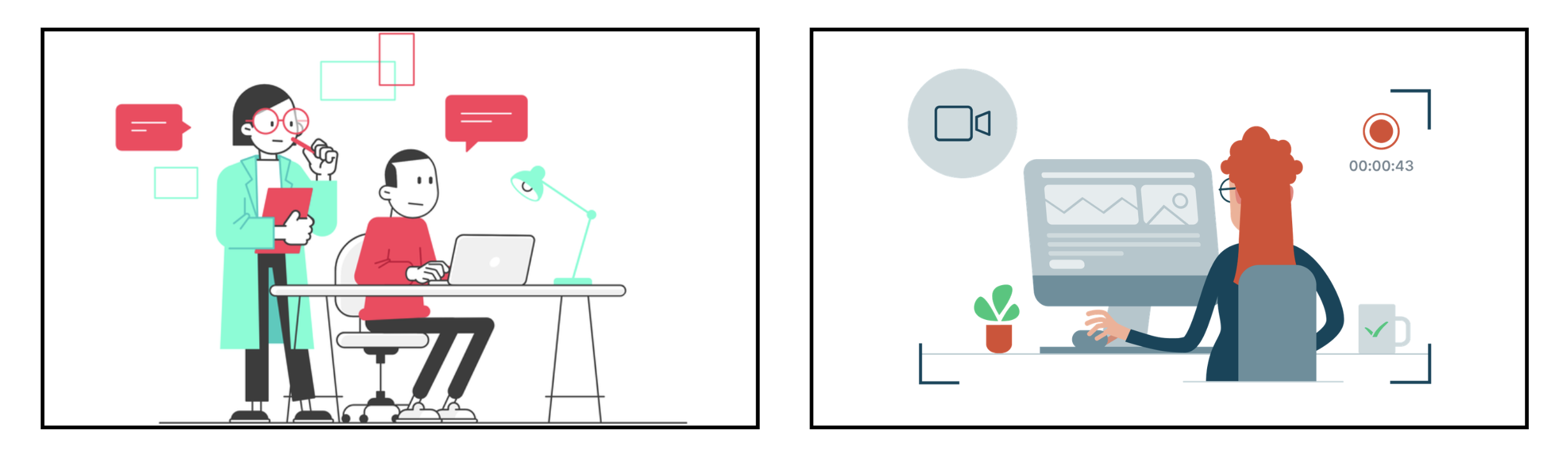
In contrast, remote unmoderated usability testing does not involve a live moderator. Instead, participants are informed about the think-aloud method in advance and are expected to verbalize their thoughts on their own throughout the session (Khayyatkhoshnevis et al., 2022; Whitenton, 2019).
Usability Test Moderation Strategies
Follow-up questioning should support participant-led reasoning rather than guiding them toward a specific path. In this study, the AI moderator was trained to emulate such strategies by asking open-ended and non-leading follow-ups.
The “AI Moderator Training Summary” document below outlines the training principles entered into the LLM-based moderator (ChatGPT) before the usability testing sessions. It reflects a synthesis of best practices from UX facilitation literature (Schade, 2017; Junge, 2022; Pernice, 2014) and guidance on relaxed think-aloud moderation (Hallihan & Shu, 2013; Nielsen, J. 2012).
AI Moderator Training Summary |
| 1. Correct Moderation Strategies |
|
Open-Ended Questioning Prompts must avoid yes/no formats and instead encourage elaboration (e.g., “What are you seeing now?” or “What do you expect to happen?”). This helps participants maintain their verbal flow (Schade, 2017). Probing without Leading Follow-ups are only used when needed and must not suggest answers. For example: User: “It would be nice if they had a way to do that…” Moderator: “Could you clarify what you mean by ‘that’?” Adaptive Prompting The moderator adjusts its support depending on whether the participant uses navigation or search, recognizing task shifts (Pernice, 2014; Nielsen, J. 2012). Echo and Boomerang Techniques Echo: Repeat user phrases with an upward intonation (“Not sure what?”). Boomerang: Redirect participant questions back to them (“What would you do here?”) (Pernice, 2014). Neutral, Non-Directive Tone The moderator avoids giving opinions, reacting emotionally, or expressing praise. It simply acknowledges responses and encourages thinking aloud (Pernice, 2014). Minimal but Timely Intervention If silence exceeds 5 seconds, the moderator prompts with: “Can you describe what you’re thinking?” or “What do you expect to happen next?” |
| 2. Common Moderation Mistakes (to Avoid) |
|
As highlighted in Nielsen Norman Group’s usability guidance (Moran & Rosala, 2023), the following behaviours were marked as errors and encoded into training prompts: Interrupting Too Soon Avoid breaking participant flow during exploration. Wait at least 5 seconds before intervening. Leading the Participant Do not phrase questions in a way that suggests answers (e.g., “Was it hard to find the navigation?”) (Schade, 2017; Hallihan & Shu, 2013). Reacting Emotionally Avoid expressing surprise, delight, or frustration. These can bias participant behavior. Being Too Friendly Moderators must maintain a professional, neutral tone and avoid casual encouragement (“Great!” or “Nice job”). Answering Participant Questions Instead of responding directly, reframe the question to elicit user reasoning (e.g., “What would you expect to happen if you clicked that?”) (Pernice, 2014). |
What Is Relaxed Think Aloud Protocol?
- Classical Think Aloud Protocol (TA): Ericsson & Simon Model
-
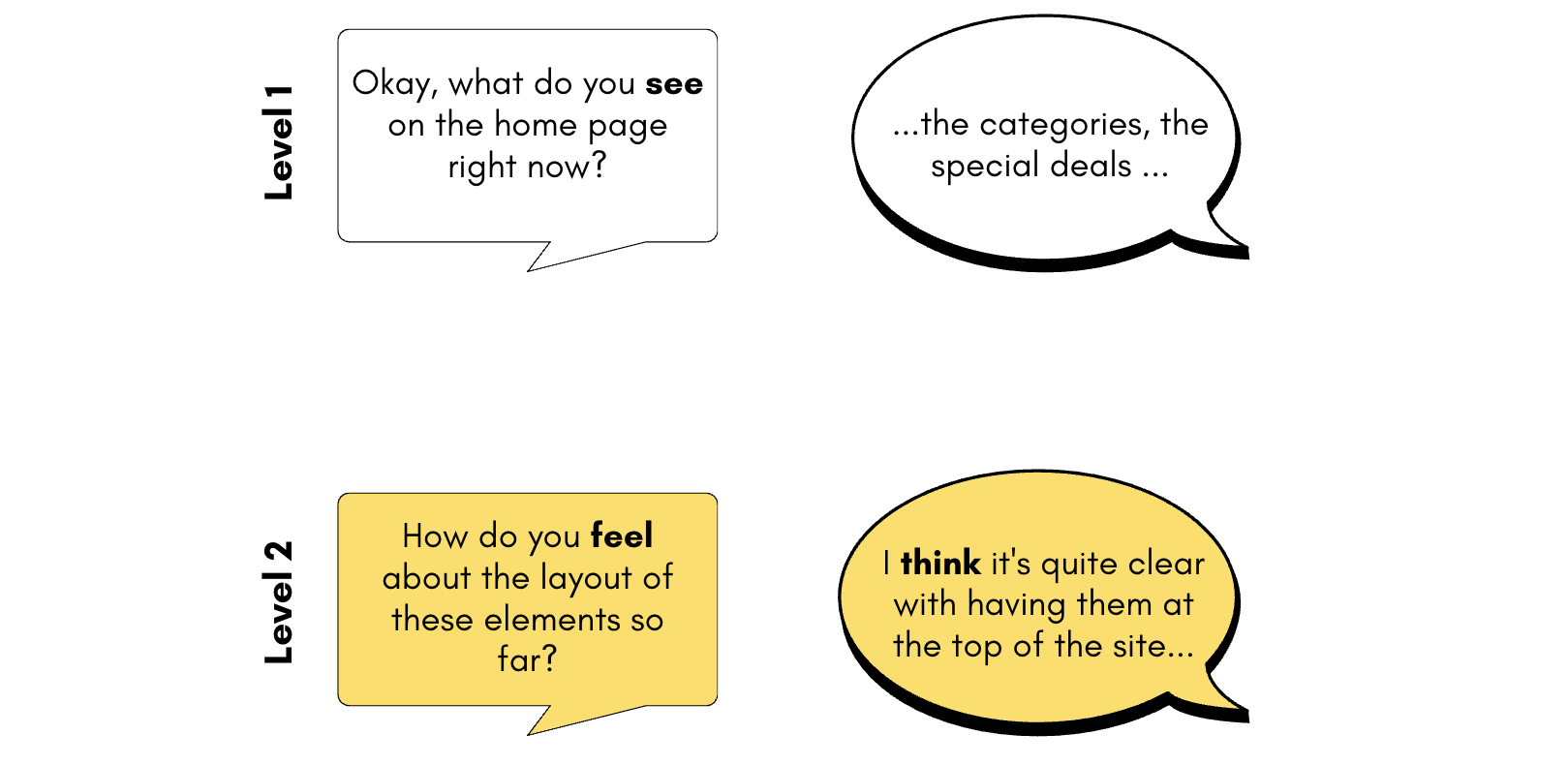
In classical TA, the moderator mainly encourages participants to talk their observations.
These target participants’
- level 1 (e.g., reading text aloud) or
- level 2 (e.g., interpreting simple visuals) verbalisations.
-
-
Relaxed Think Aloud Protocol: Boren & Ramey Model
- Extends classical TA by also allowing “why” or “expectation” questions.
This elicits participants’
- level 3 verbalisations (retrospective reasoning, assumptions, design ideas).

- Why I Chose Relaxed-TA in My Research?
- Usability research benefits from Level 3 insights (expectations, prior experiences, revision ideas).
- Naturally aligns with AI voice assistants’ tendency to ask deeper questions.
Research Questions and The Goal
1. How effectively can an AI be trained to moderate usability testing with a realistic human-like tone?
By training and observing GPT-4o in this role, the study seeks to evaluate both the capabilities and limitations of LLMs in replicating the nuanced,
non-directive moderation style expected of human moderators.
To address this question, I configured ChatGPT through personalisation settings with the “moderation strategies” (e.g., asking open-ended questions) and moderation tone (e.g., not being friendly) presented in Slide 3. In the analysis part of the study, I examined the consistency of AI moderation by analysing how well the AI’s verbalisations in the usability test transcripts adhered to these strategies and tone.
2. How do participants’ verbalization levels unfold when usability testing is moderated by an AI?
Building on this context, the goal of the present study is to investigate how the tone and strategies used by an AI moderator affect participant behaviour in usability testing, particularly within the relaxed think-aloud framework.
To address this question, in the analysis part of the study I coded participants’ verbalisations in the usability test transcripts as Level 1, 2, or 3. These verbalizations, together with the AI’s follow-up questions, were then analyzed to assess the effectiveness of relaxed TA.
Research Goal:
Through the analysis of AI–user interactions and verbal outputs, the study aims to contribute to emerging literature on AI-mediated research methods and provide practical guidance for applying LLMs in user research contexts.
Research Design
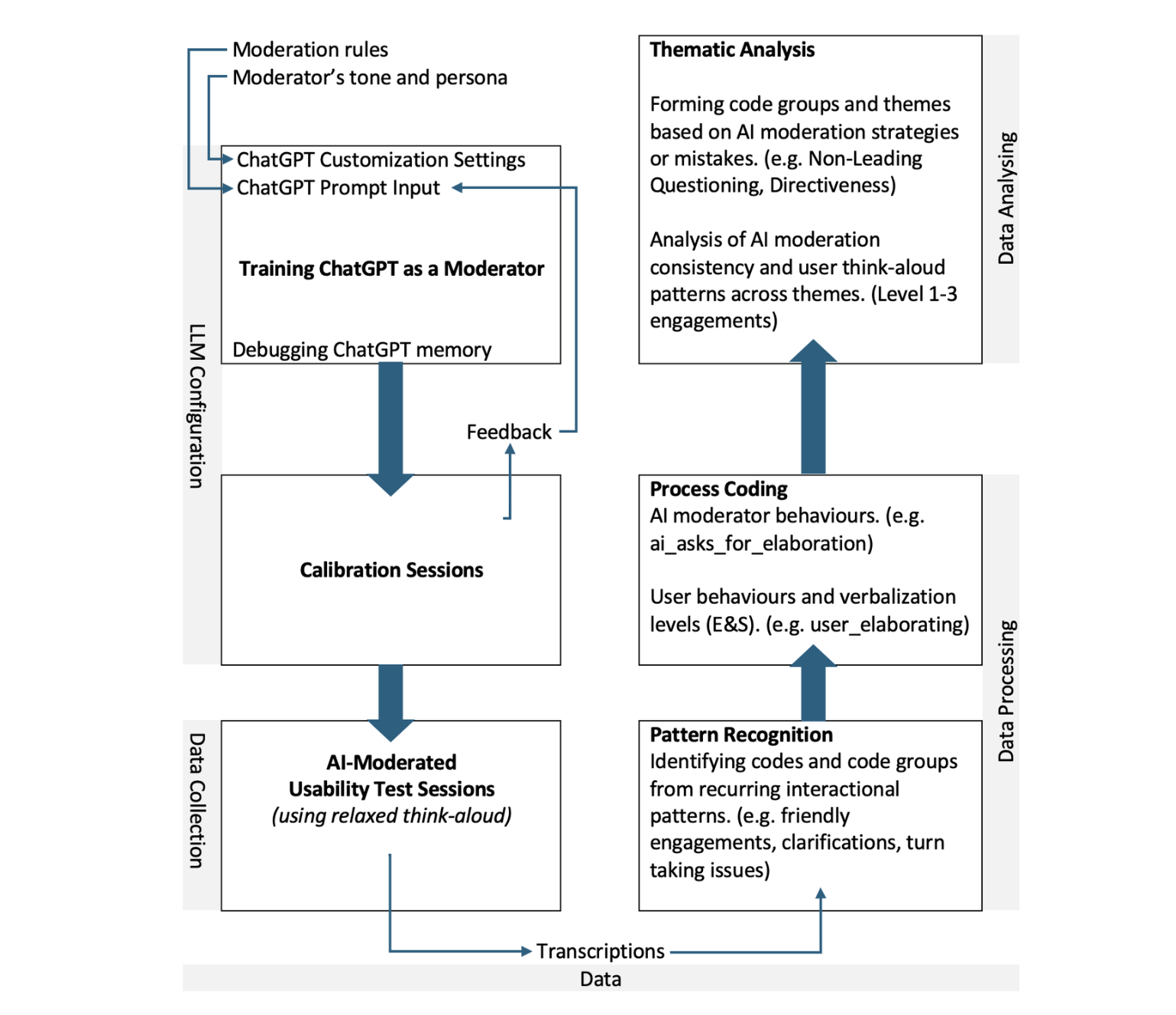
Training ChatGPT as a Moderator
- Input of tasks, moderation strategies → ChatGPT memory
- Moderation tone, persona → ChatGPT customisation settings
- Iterative debugging of memory
Calibration Sessions
- Tested AI responses in 3 pilot sessions
- Gave feedback to refine AI moderator’s prompts & tone
AI-Moderated Usability Test Sessions
- Conducted usability tests with real participants in 9 regular sessions
- Online shopping website / 4 usability tasks / voice and video recordings
- Transcriptions of regular sessions
Pattern Recognition
- Grouped recurring interactional patterns
- Identified issues (e.g., clarifications, turn-taking)
Process Coding Using Atlas.ti Software
- Labeled AI behaviour codes (e.g., asks_for_elaboration)
- User verbalisation codes by levels (1–3) (e.g., user_elaborating)
- Used Atlas.ti and specified 1486 quotations / 44 codes in transcriptions
Thematic Analysis
- Formed code groups & themes from patterns
- Analyzed AI moderation consistency & user think-aloud depth
- 8 code groups / 4 Themes
Training ChatGPT as a Moderator
This study began with a practical idea: Is it possible to combine the flexibility of unmoderated testing with the follow-up questioning benefits of moderated sessions by using a large language model (LLM) as a moderator? In this study, ChatGPT-4o Advanced Voice Mode was configured to encourage users to think aloud during usability tasks by asking timely, non-leading follow-up questions.
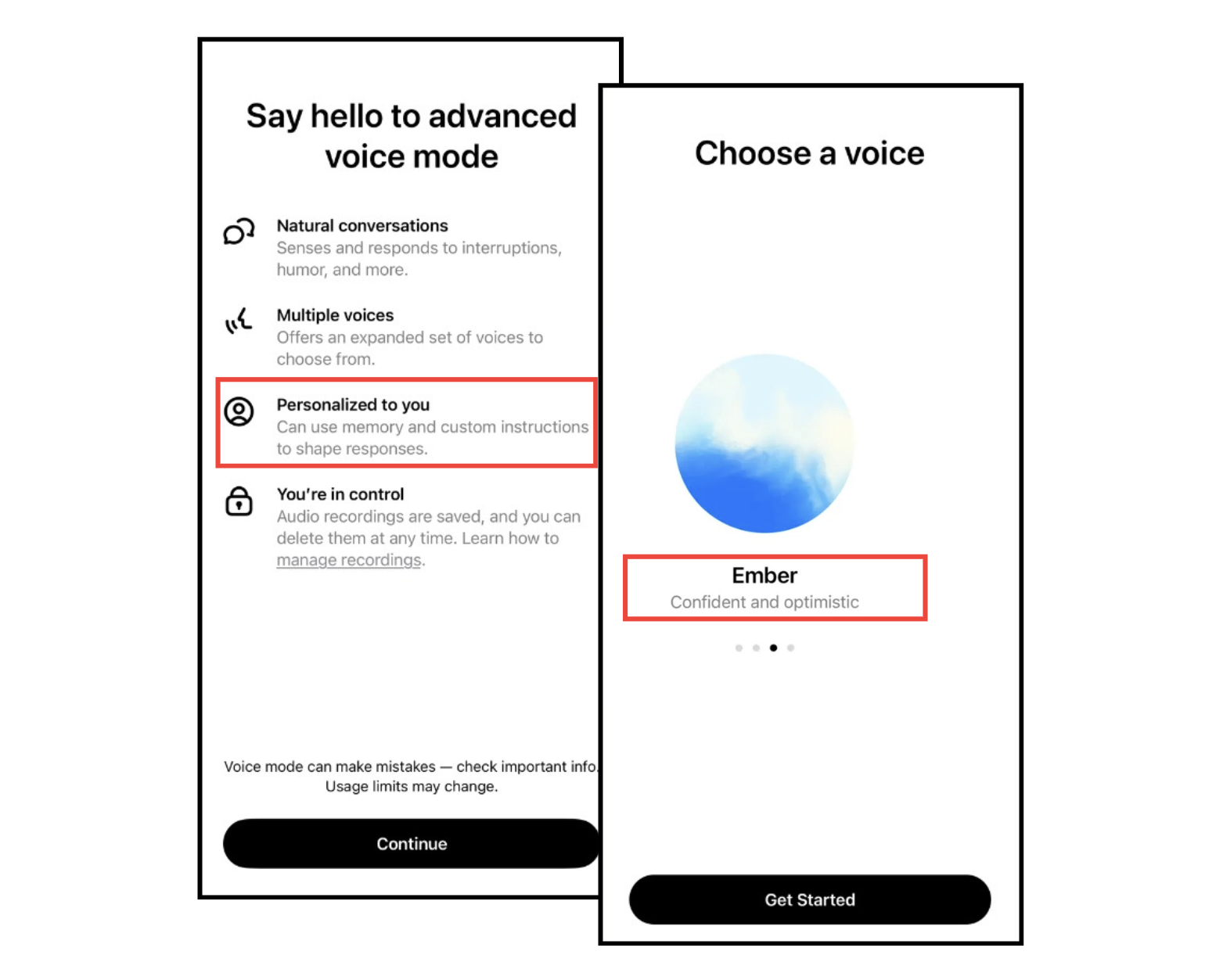
ChatGPT Personalisation Settings:
1 Customize ChatGPT
The fields were configured to define ChatGPT’s tone and tasks. For example:
“ChatGPT’s name is Michael. The usability study starts when Advanced Voice Mode is activated.”
“ChatGPT acts as a usability test moderator, not an assistant—meaning it should not instruct the participant on what to do next but instead facilitate their thought process.”
2 Reference Chat History
All tasks, opening and closing prompts, the flows of the four activities, and the moderation strategies (Slide 3) were entered into ChatGPT as chat prompts.
3 Manage Memories
The chat prompts from Step 2 were saved and debugged.
Additionally, feedback prompts from calibration sessions were entered, and those saved as memories were debugged as well.
In total, 40 saved memories were used to achieve optimum moderation before moving on to the regular sessions.
Usability Test Sessions and Transcriptions
Each session was conducted one-on-one in a quiet room, using an internet browser on a laptop, ChatGPT Advanced Voice Mode as the moderator, screen recording, and Lookback.io for task prompts. Participants engaged in sessions of apprx. 30 minutes, each consisting of four activities on the Chef’s Deal website.
Transcriptions
Usability sessions were recorded using the iOS Voice Memos application. Transcriptions were generated directly from the same app and manually revised for punctuation and grammatical errors.
Pattern Recognitions and Process Coding
Transcripts were coded using ATLAS.ti software. The coding process was situated within a reflexive thematic analysis framework (Braun & Clarke, 2006, 2021). Codes were initially developed through pattern recognition and then refined using process coding (coding behaviours) to capture emergent interactional patterns. The transition from pattern recognition to theme formation followed a bottom-up approach.
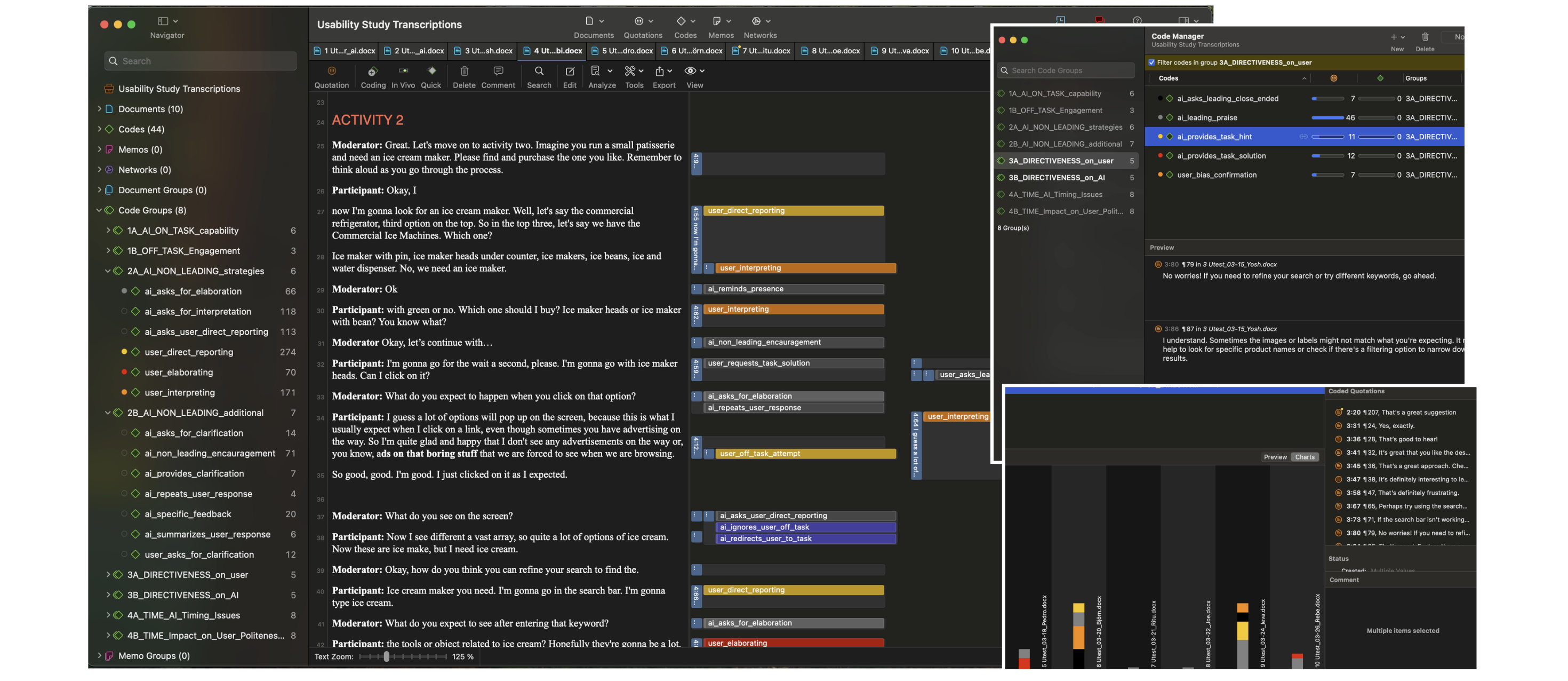
Pattern Recognitions and Process Coding
In total, nine transcripts were coded, resulting in 1,1486 coded quotes across 44 unique codes. From these, 35 recurring codes that appeared across multiple sessions were selected to form the final codebook presented below.
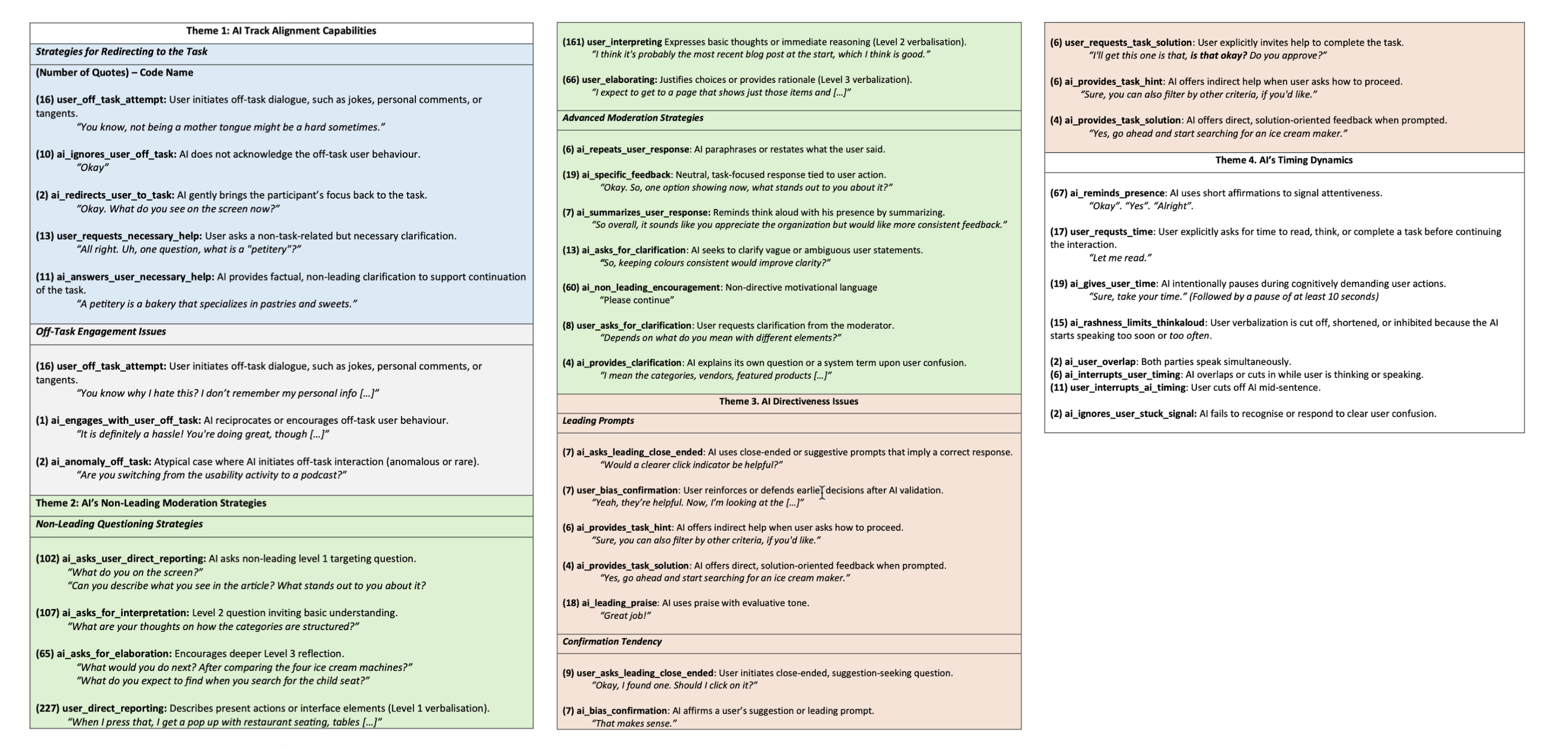
Thematic Analysis
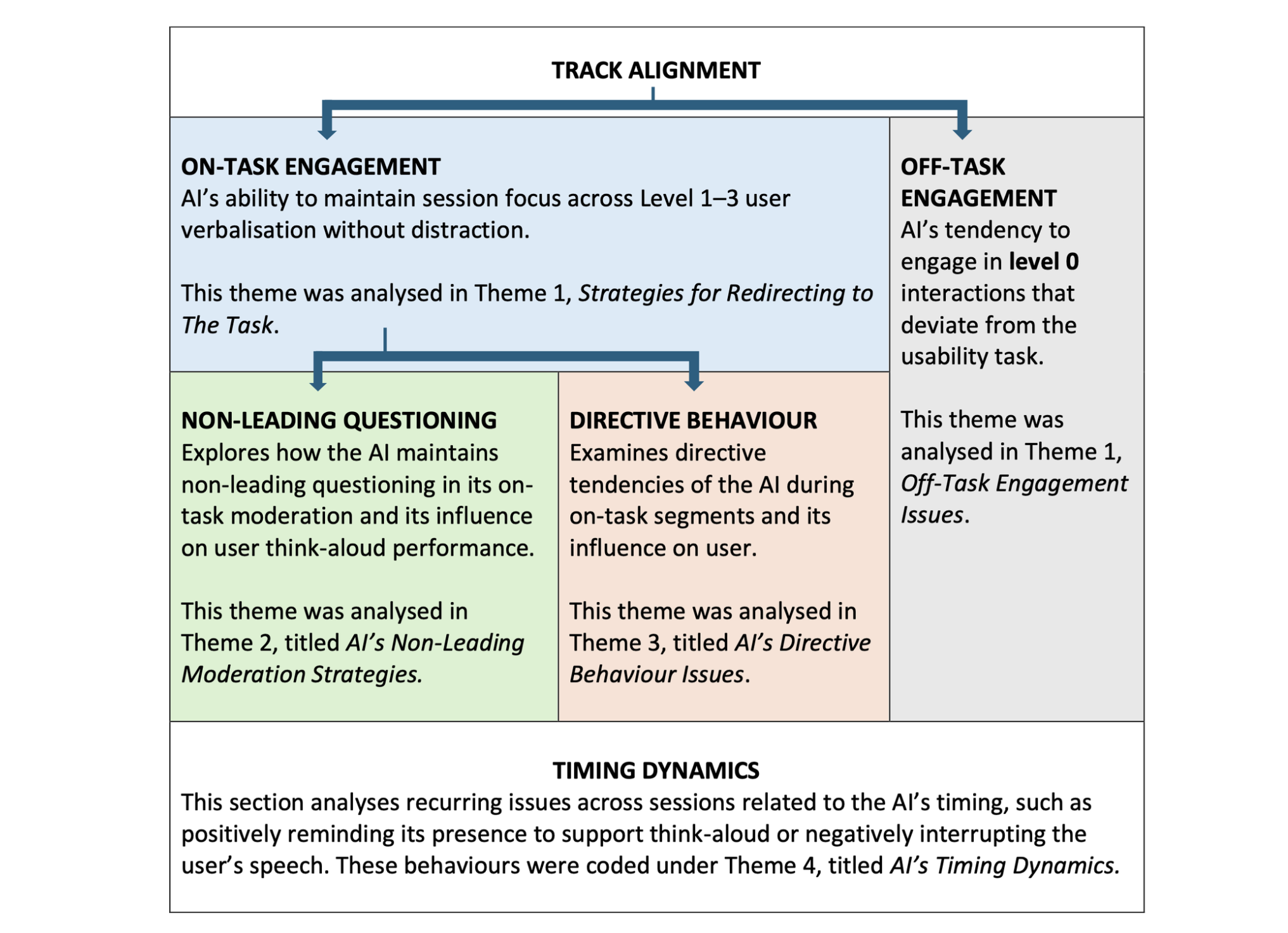
Theme 1: AI’s Track Alignment Capabilities
This theme analyses how the AI responded when participants initiated off-task verbalisation (Level 0). It focuses on whether the AI was able to redirect users back to the task (Levels 1–3) or showed a tendency to engage with off-task behaviour.
Theme 2: AI’s Non-Leading Moderation Strategies
While the previous theme focused on how the AI moderator managed off-task attempts, this theme examines how the AI guided on-task verbalisations (level 1-3) through different types of non-leading question strategies, as well as how users responded in terms of their think-aloud performance.
Theme 3: AI’s Directive Behaviour Issues
This theme examines cases where the AI maintained on-task engagement through level 1–3 targeting questions yet displayed issues of directiveness. These instances typically occurred when the AI, instead of applying the non-leading strategies discussed in Theme 2, responded to participants’ moments of task difficulty by offering task hints or confirming user-initiated verification questions related to the next task step.
Theme 4: AI’s Timing Dynamics
This theme examines the AI moderator’s timing behaviour throughout the usability sessions. It covers both positive examples, such as reminders of presence that encourage the user to think aloud, and timing issues, such as the AI responding too frequently.
Results
Consistency of Conversational AI Moderator
Contextual Responsiveness
This study observed moments of effective context-sensitive prompting. For instance, when a participant struggled to find a product, the AI responded with a task-aware prompt: "So, what’s your plan for adjusting your search?" This demonstrated that task-specific training can enable the AI to simulate a degree of situational understanding.
Managing Off-Task Engagement and Tone
One of the initial moderation challenges encountered was the AI moderator's tendency to engage with off-task or humorous participant remarks. These Level 0 verbalizations often disrupted task flow and prolonged the session. However, calibration feedback provided after early sessions effectively minimized such engagement in regular sessions.
While overall tone consistency improved, the AI continued to exhibit praise-like responses such as "Great job!" despite customisation. This was likely influenced by the embedded tone of the selected voice interface (OpenAI, 2025b), which remained assistive and optimistic by default.
Maintaining Non-Directive Moderation
While directive behaviour decreased following calibration, it was not eliminated entirely. In certain sequences, the AI responded affirmatively to close-ended questions (e.g., "Should I click here?"), inadvertently steering the user.
Despite training for neutrality, the LLM’s underlying assistive tendency (OpenAI, 2025a) influenced behaviour. This underscores the difficulty of fully suppressing directive behaviour in systems designed to assist. Still, most responses adhered to neutral prompting formats, demonstrating partial success in maintaining a non-leading moderation style.
Turn-Taking and Timing Dynamics
Nevertheless, the AI demonstrated variable behaviours based on different task structures. During navigation-heavy tasks, it frequently prompted with short intervals to capture real-time cognitive processing. In contrast, during typing tasks (e.g., filling in fields), it adopted a more patient stance, often pausing with acknowledgments like “Take your time.” This nuanced behaviour suggests some contextual calibration, even if broader timing issues persisted.
Viability of Relaxed Think-Aloud Protocol
This section evaluates Theme 2: AI’s Non-Leading Moderation Strategies, where the AI moderator demonstrated consistent adherence to relaxed think-aloud practices. ‘
Participants responded with corresponding verbalization levels. Level 1 and Level 2 verbalizations were commonly produced during smooth task progression, while Level 3 verbalizations emerged when participants encountered difficulties or paused to reason through complex interface elements. These higher-level verbalizations often involved assumptions, predictions, or critiques of visual design. In moments of hesitation, AI’s elaborative follow-up questions enabled users to reflect and resume task completion, echoing Krahmer and Ummelen’s (2004) findings that participants using relaxed protocols completed more tasks and experienced less navigational confusion.
Additionally, the presence of the AI moderator appeared to sustain user engagement. While more frequent prompts sometimes resulted in shorter responses, users spoke at greater length and with more continuity during less interrupted phases. AI’s ability to keep users verbalising through follow-up questions corresponds with findings from Hertzum et al. (2015), who noted, “participants in moderated sessions may provide shorter responses, as the presence of a moderator allows for follow-up questions or clarification, reducing the need for detailed self-explanations.”
In conclusion, when the AI moderator adhered to professional moderation practices, participant verbalisations both quantitatively and qualitatively consistent with prior human-moderated usability studies. These findings suggest that AI-led relaxed think-aloud sessions hold promise as a viable alternative in UX research.
Challenges
First, customisation of ChatGPT was subject to system-imposed character limits. Instructional fields for defining moderator tone and strategy were capped at 1500 characters (OpenAI, 2025b), which constrained the depth and specificity of prompt-based training and could affect consistency in moderation behaviour.
Second, the study found that introducing new training prompts can reduce moderation errors; however, overloading the system with numerous saved instructions may hinder the AI’s ability to apply them consistently. It was observed that when an excessive number of prompts were stored, the LLM struggled to prioritise or reconcile overlapping rules. To mitigate this, training instructions should be concise, unambiguous, and minimal in number.
Third, the lack of real-time screen sharing which is potentially valuable for more context-sensitive AI responses reduced the AI moderator’s situational awareness and limiting the ability to adapt dynamically to participant actions.
Fourth, despite the customization efforts to maintain a neutral and professional tone, the LLM’s underlying assistive tendency may have introduced subtle confirmation bias (Stokoe et al., 2024).
Fifth, the lack of a pre-session participant information segment was based on examples from human-moderated usability test studies. However, as noted by Boren and Ramey (2000) in their discussion of highly expressive or “chatty” participants, variations in user characteristics can lead to shifts in the AI’s tone. This highlights the need to tailor pre-session information specifically for AI-moderated sessions.
References |
|
Boren, M. T., & Ramey, J. (2000). Thinking aloud: Reconciling theory and practice. IEEE Transactions on Professional Communication, 43(3), 261–278. https://doi.org/10.1109/47.867942 Ericsson, K. A., & Simon, H. A. (1984). Protocol analysis: Verbal reports as data. Cambridge, MA: MIT Press. Hallihan, G. M., & Shu, L. H. (2013). Considering confirmation bias in design and design research. Journal of Integrated Design and Process Science, 17(4), 19–35. https://doi.org/10.3233/jid-2013-0019 Hertzum, M., Borlund, P., & Kristoffersen, K. B. (2015). What do thinking-aloud participants say? A comparison of moderated and unmoderated usability sessions. International Journal of Human-Computer Interaction, 31(9), 557–570. https://doi.org/10.1080/10447318.2015.1065691 Junge, J. (2022, March 13). Confirmation bias in UX. Nielsen Norman Group. https://www.nngroup.com/articles/confirmation-bias-ux/ Khayyatkhoshnevis, P., Tillberg, S., Latimer, E., Aubry, T., Fisher, A., & Mago, V. (2022). Comparison of moderated and unmoderated remote usability sessions for web-based simulation software: A randomized controlled trial. In M. Kurosu (Ed.), Human-computer interaction. Theoretical approaches and design methods. HCII 2022. Lecture Notes in Computer Science (Vol. 13302). Springer, Cham. https://doi.org/10.1007/978-3-031-05311-5_16 Krahmer, E., & Ummelen, N. (2004). Thinking about thinking aloud: A comparison of two verbal protocols for usability testing. IEEE Transactions on Professional Communication, 47(2), 105–117. https://doi.org/10.1109/TPC.2004.828205 Moran, K., & Rosala, M. (2023, June 21). Usability test facilitation: 6 mistakes to avoid [Video]. Nielsen Norman Group. https://www.nngroup.com/videos/usability-test-mistakes/ Nielsen, J. (1994). Usability testing. In Usability engineering. Elsevier Science & Technology. Nielsen, J. (2012, January 15). Thinking aloud: The #1 usability tool. Nielsen Norman Group. https://www.nngroup.com/articles/thinking-aloud-the-1-usability-tool/#t… OpenAI. (2025a, April 11). ChatGPT model behavior guidelines. https://model-spec.openai.com/2025-04-11.html OpenAI. (2025b). Custom instructions for ChatGPT. OpenAI Help Center. https://help.openai.com/en/articles/8096356-custom-instructions-for-cha… Pernice, K. (2014, January 26). Talking with participants during a usability test. Nielsen Norman Group. https://www.nngroup.com/articles/talking-to-users/ Schade, A. (2017, December 17). Avoid leading questions to get better insights from participants. Nielsen Norman Group. https://www.nngroup.com/articles/leading-questions/ Stokoe, E., Albert, S., Buschmeier, H., & Stommel, W. (2024). Conversation analysis and conversational technologies: Finding the common ground between academia and industry. Discourse & Communication, 18(6), 837–847. https://doi.org/10.1177/17504813241267118 Whitenton, K. (2019, October 27). Unmoderated user tests: How and why to do them. Nielsen Norman Group. https://www.nngroup.com/articles/unmoderated-usability-testing/ |
Explore similar projects
